
We often choose a desk by looking first at its shape, its storage or the timber it is made from. These things matter—but if you are going to spend hours working there, one measurement deserves attention before almost anything else: the height of the desk.
Many ready-made desks are somewhere around 73–75cm high. That may work perfectly well for some people, but it is not a universal “correct” height. We do not all have the same length legs, arms or torso. We do not sit in the same chair, use the same equipment or carry the same vulnerabilities in our bodies.
A desk made to an average is exactly that: a desk made for an average. You are an individual.

A desk made both for homework and gaming
The right desk height is the one that allows your shoulders to relax, your elbows to remain close to your sides and your hands to reach the keyboard without bending your wrists or leaning forwards.
This guide will help you find that height. It also covers desk width and depth, chair choice, screen position, lighting, movement and the small design decisions that can make a home office more comfortable and enjoyable to use.
The quick answer
When you are sitting comfortably, the top of your keyboard should be just below elbow height. Your shoulders should feel relaxed, your upper arms should hang naturally beside you, your forearms should be approximately horizontal and your wrists should remain straight.
Why the standard desk height does not suit everyone
The problem with a so-called standard desk is not that it is badly designed. It is that a single fixed measurement cannot fit every body.
Someone who is shorter may find that a standard desk sits too high. Their shoulders lift towards their ears, their elbows move outwards and their wrists bend upwards to type. Raising the chair can bring their arms into a better position, but then their feet may no longer reach the floor. A footrest can solve that problem, but it is still a workaround.
A taller person may face the opposite difficulty. They may have to lower their chair, fold their legs awkwardly beneath the desk or lean down towards their work. The desk may also have too little clearance for their thighs, particularly if it has deep drawers or a thick rail beneath the top.
Two people of exactly the same overall height can also need different desk heights. One may have longer legs and a shorter torso; the other may have a longer torso and arms. This is why a height chart can offer a rough starting point, but it should never replace measuring the actual person.
Good ergonomics is not about forcing everybody into one rigid “perfect posture”. It is about fitting the work to the person, reducing avoidable strain and making it easy to change position throughout the day.
Why this matters to me personally
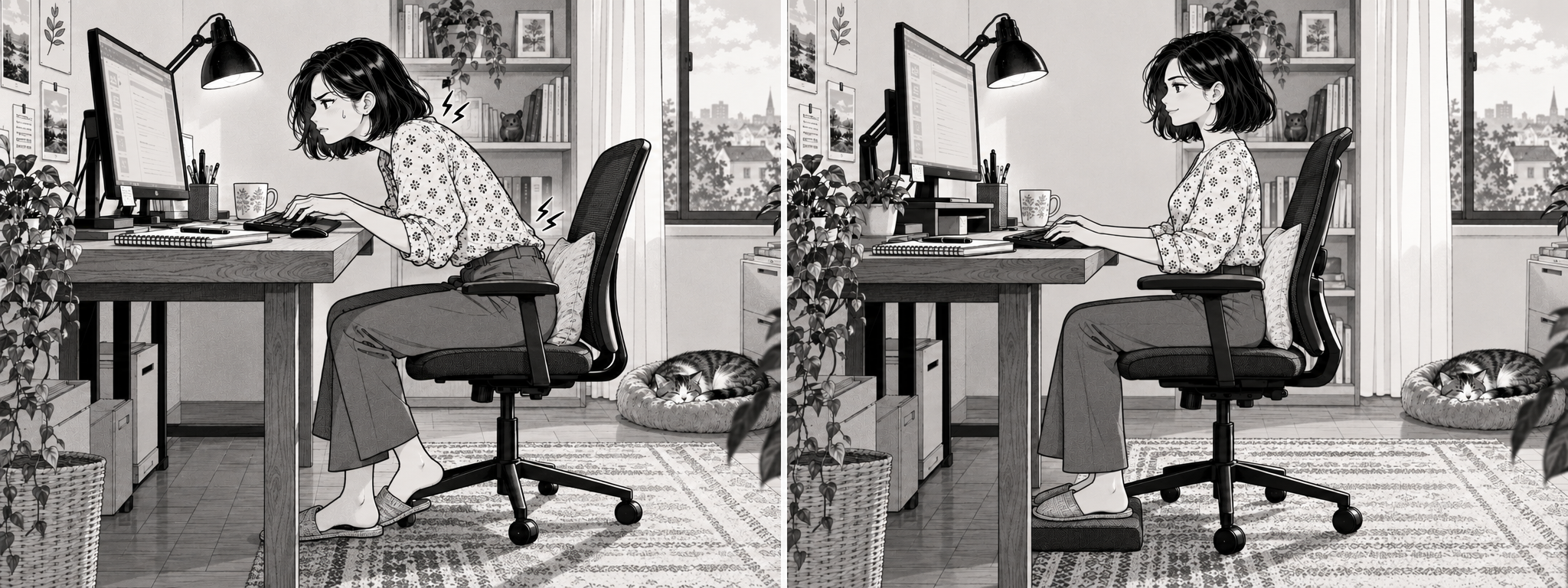
A desk suited to your body can make a huge difference.
I am shorter than average, so I know how often furniture is designed around a body that is not mine.
After being involved in a car crash, I also carry a vulnerability in my neck and back. Sitting for too long can cause it to flare up and leave me in pain. No desk can remove the need to move, take breaks or listen to my body, but having my chair, keyboard and work surface at the right height reduces one unnecessary source of strain.
For me, an appropriately sized desk is not a fussy extra. It is part of being able to work comfortably and look after myself while I do it.
That experience has made us think differently about what “bespoke” should mean. It should not only mean choosing the timber, dimensions and number of drawers. It should mean considering the person who will sit at the desk and the work they will do there.
How to measure your ideal seated desk height
Do not begin by measuring a desk. Begin with your body and your chair.
What you will need
- The chair you intend to use, if possible
- The footwear you normally wear while working
- Your keyboard, if you use one
- A tape measure
- Ideally, another person to take the measurement
Step 1: Adjust your chair first
Sit well back in the chair so your back is supported. Adjust the seat until:
1. your feet rest comfortably and fully on the floor;
2. your thighs feel supported without pressure behind the knees;
3. your knees are approximately level with, or slightly lower than, your hips; and
4. there is a small gap—roughly 2–3cm—between the front of the seat and the backs of your knees.
If your feet cannot rest comfortably on the floor once your arms are at the correct working height, use a stable footrest. Do not leave your feet dangling.
Step 2: Find your natural elbow position
Relax your shoulders. Let your upper arms hang naturally beside your body and bend your elbows so your forearms are roughly horizontal. Keep your wrists straight rather than bending them up, down or sideways.
Your elbows will usually be around a right angle, although comfort matters more than achieving an exact 90 degrees.
Step 3: Measure from the floor to your elbow
Ask somebody to measure vertically from the floor to the underside of your elbow or forearm while you stay relaxed. This is your seated elbow height.
Take the measurement on the floor surface on which the desk and chair will actually stand. A thick rug, different footwear or a seat cushion can all change the relationship slightly.
Step 4: Allow for the keyboard
The important measurement is the height of your hands while typing—not simply the height of the wooden desktop.
The top of the keys should normally sit just below your elbow height. If your keyboard is 2cm high, the desktop will need to be lower than the target height of the keys.
Use this simple calculation:
Finished desktop height = seated elbow height − desired drop below the elbow − keyboard height
A small drop of approximately 0–3cm below the elbow is a useful starting range. Your shoulders should remain relaxed, your elbows should stay beside you and your wrists should feel straight.
Example: If your seated elbow height is 68cm, you want the keys 1cm below your elbow and your keyboard is 2cm high:
68cm − 1cm − 2cm = a desktop height of approximately 65cm
If that result is much lower than a ready-made desk, it does not necessarily mean you have measured incorrectly. It may simply show how poorly a standard fixed height suits your body.
Step 5: Test the measurement before ordering
Measurements are an excellent starting point, but your body should have the final say.
Create a temporary working surface at the proposed height using a safe, stable board or an adjustable table. Sit there with your chair, keyboard and mouse for long enough to notice what your body does when you stop consciously “sitting properly”.
Check that:
1. your shoulders remain down rather than creeping upwards;
2. your elbows stay close to your sides;
3. your wrists remain straight;
4. you can sit close to the desk without reaching forwards;
5. there is comfortable clearance above your thighs; and
6. your feet remain supported.
If you have a pain condition, previous injury, disability or specialist equipment, take any recommendations from your physiotherapist, occupational therapist, ergonomist or occupational-health adviser into account too.
Signs that your current desk may be too high or too low
Your desk may be too high if:
1. you lift or tense your shoulders while typing;
2. your elbows spread out from your body;
3. your wrists bend upwards;
4. you raise your chair so far that your feet dangle;
5. the front edge presses into your forearms; or
6. you develop tension around your neck and shoulders as the day continues.
Your desk may be too low if:
1. you lean or slump forwards to reach your work;
2. your head repeatedly drops towards the desk;
3. your forearms angle noticeably downwards;
4. your knees or thighs feel cramped beneath the top; or
5. a low screen causes you to bend your neck.
Remember that the desktop, keyboard and screen are three separate things. A desk can be the right height for typing while the screen is still too low. Solve them in this order:
6. Chair
7. Desk and keyboard
8. Screen
9. Mouse and other frequently used items
What if more than one person uses the desk?

Two desks for a home office. Each desk has been adjusted to the suit the person using it.
A fixed-height desk can be beautifully tailored to one main user. If two people of noticeably different heights will share it regularly, an adjustable-height solution may be more practical.
Another option is to set the fixed desk for the taller user and use a properly adjusted chair and footrest for the shorter user, although each person should still be able to keep their shoulders relaxed and their feet supported.
For children and teenagers, whose bodies are still changing, adjustability is particularly useful.
How wide and deep should a desk be?
There is no single correct width or depth either. Begin by listing what genuinely needs to live on the desk every day.
The following are practical starting points rather than rigid rules:
How the desk will be used?
Useful starting size
Occasional laptop use or a compact writing desk : 100–120cm wide × 60–70cm deep
Everyday work with one monitor : 120–140cm wide × 70–80cm deep
One monitor plus papers, books or creative work : 140–160cm wide × 75–80cm deep
Two monitors or equipment-heavy work: 160–180cm wide × around 80cm deep
Depth matters more than many people realise
Your screen should normally be approximately an arm’s length away. The Health and Safety Executive recommends placing it about an arm’s length from you, with the top of the screen around eye level. A deeper desktop makes this easier, particularly with a large monitor or a monitor on a stand.
A monitor arm can free up space and make a shallower desk more workable, but check before ordering that the rear edge and under-desk structure will accept its clamp.
Give yourself room to move
The space beneath the desk should remain clear enough for you to change leg position and bring the chair close to the work surface. Drawers, cable boxes, computers and deep wooden rails should not occupy the knee space you actually need.
Before deciding on the overall footprint, mark the proposed desk and chair area on the floor with masking tape. Put the chair inside it, pull it back as you would when standing up and walk around it. This simple test reveals far more than room measurements alone.
Choose the chair and desk as a pair
Even the best desk cannot compensate for a chair that does not fit you. Look for a chair that is easy to adjust while you are sitting in it and allows you to:
1. place your feet flat on the floor or on a footrest;
2. sit back with comfortable lower-back support;
3. keep your hips approximately level with or slightly higher than your knees;
4. leave a 2–3cm gap behind your knees;
5. bring the chair close to the desk; and
6. support your forearms without lifting your shoulders.
Adjustable or removable armrests are useful. Fixed armrests that collide with the desktop can force you to sit too far away and reach forwards.
Seat depth is particularly important for people who are shorter or taller than average. A seat that is too deep can press behind the knees and prevent a shorter person from using the backrest. A shallow seat may not support a taller person’s thighs adequately.
Whenever possible, try a chair before buying it. A long list of “ergonomic” features is less important than whether those adjustments fit your particular body.
Position your screen to support your neck and eyes
Once your chair and keyboard height are right, adjust the screen independently.
1. Place the main screen directly in front of you so you do not repeatedly twist your neck.
2. Start with the top of the screen at, or slightly below, eye level.
3. Keep it approximately an arm’s length away, then adjust the text size rather than leaning forwards to read.
4. Keep the mouse close beside the keyboard, at the same height, so you do not have to reach.
5. If you use two screens, put the screen you use most directly in front of you. If you use both equally, centre yourself between them and angle them slightly inwards.
A laptop needs a little extra help
A laptop joins the screen and keyboard together, so it is almost impossible to place both at an ideal height for prolonged work. If the keyboard is low enough for your arms, the screen is usually too low for your neck.
For longer working sessions, raise the laptop on a stable stand and use a separate keyboard and mouse—or connect it to a separate monitor.
Where should the desk sit in the room?
The most beautiful position is not always the most comfortable one, particularly when screens are involved.
Work with daylight, not against it
Natural light can make a workspace feel much more pleasant, but direct sunlight and strong reflections make a screen tiring to view.
Where possible:
1. position the screen at roughly a right angle to the window rather than directly facing it;
2. avoid placing a bright window immediately behind the screen;
3. avoid having strong sunlight behind you reflecting on the display;
4. use blinds or curtains to soften changing daylight; and
5. adjust the screen brightness to suit the room rather than leaving it permanently very bright.
Add light for the task
Use comfortable general room lighting and add an adjustable task lamp if you read, draw or write on paper. Place the lamp on the opposite side to your writing hand to reduce shadows, and aim it so that it does not shine directly into your eyes or reflect in the screen.
A low-sheen or matt desktop finish can also help reduce distracting reflections.
Think about the whole room
Allow room for the chair to move and for drawers or cupboard doors to open. Notice the position of sockets, radiators, doorways and routes through the room. Keep frequently used items close enough to reach without repeatedly twisting, but place occasional items farther away so that you have a natural reason to stand up.
Some people concentrate better with a view; others find it distracting. Once glare and physical comfort are dealt with, choose the orientation that makes you feel most settled and able to work.
The best posture is your next posture
An excellent desk setup can reduce awkward positions, but it cannot make hours of stillness ideal. Bodies are made to move.
Change position regularly. Stand to make a telephone call, walk while thinking through a problem, refill your water or alternate screen work with a task that takes you away from the desk.
The HSE advises taking short breaks more often rather than saving them for one long break—giving 5–10 minutes every hour as a better example than 20 minutes every two hours. A break can be a change of task, provided it allows you to move, stretch or change posture.
A sit-stand desk can offer more variety, but standing still all day is not the answer either. If you work standing up, set the keyboard just below your standing elbow height and keep the screen high enough that you do not drop your head. Alternate between sitting, standing and moving according to what feels comfortable.
Your desk-height checklist
Before ordering a desk, check that you know:
1. Who will use it most often
2. Their seated elbow height in the chosen chair
3. The height of the keyboard or equipment on the desktop
4. The finished desktop height required
5. The chair’s seat height, seat depth and armrest height
6. The clearance needed above the thighs and around the knees
7. The number and size of screens
8. Whether a monitor arm needs to clamp to the back
9. How much paper, equipment and storage the work requires
10. Where cables and sockets will sit
11. Daylight falls across the desk during the day
12. How the chair will pull out and how people will move around it
A desk made for a person—not an average
At Nuthatch Creations, we believe that bespoke furniture should fit the life around it. For a desk, that means understanding not only the room and the timber you love, but your height, your chair, your equipment, your working habits and anything that would make the space more comfortable for you.
Those details can shape the finished height, width, depth, drawer position, knee clearance, cable management and screen arrangement. The result is not simply somewhere to put a computer. It is a considered place to think, make, plan and work.
If you are planning a desk, take your seated elbow measurement before you begin. It is a small act of design that acknowledges something important: your body was never meant to adapt itself to an arbitrary standard.
Your desk should adapt to you.
Planning a bespoke desk or home office?Explore our handcrafted desks and home-office furniture, made in Herefordshire from beautiful British-grown timber, or tell us about the space you would like to create.
Sources and further reading
1. Health and Safety Executive: Good posture when using display screen equipment
2. Health and Safety Executive: Work routine and breaks
3. Health and Safety Executive: Lighting, glare and working space
4. Cambridge University Hospitals: Seating and ergonomics
5. Chartered Institute of Ergonomics & Human Factors: Home working and staying healthy
6. Health and Safety Executive: Working safely with display screen equipment
This article provides general ergonomic information rather than individual medical advice. If work is causing persistent pain, numbness or other symptoms—or if you are adapting a workstation around an injury or health condition—seek advice from an appropriate healthcare or occupational-health professional. Employees who regularly use display-screen equipment can also ask their employer for a DSE workstation assessment.